How overage billing works on Expert
Running out of lead capacity shouldn’t be a surprise.
Here’s exactly what happens when you hit your monthly limit and how to stay ahead of it.
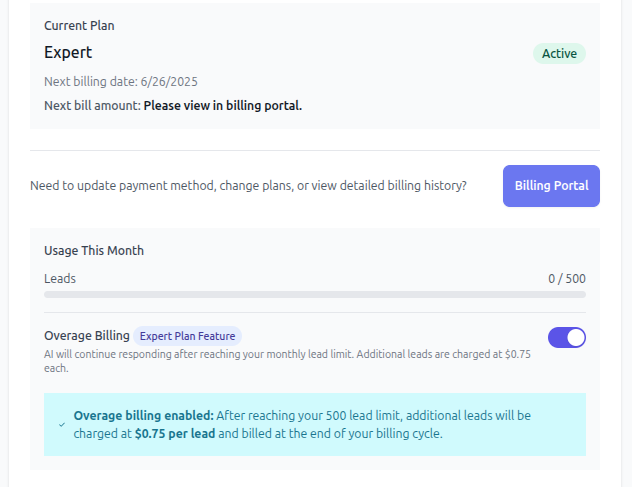
1 - Check your plan & usage
- Open Settings ▸ Subscription
https://app.leadtruffle.com/settings/subscription
- You’ll see:
- Current plan + lead cap
- Leads used this cycle
- Billing history (powered by Stripe)
2 - What counts as a “lead”?
- Any new website form, chat, SMS, or voice call that the AI engages with.
3 - Overage behavior
Basic & Pro
- Heads-up: we email you when you hit ~75%, ~90%, and 100% of your cap.
- Grace window: we’ll keep responding for a few extra days so you’re not caught flat-footed.
- Hard stop: if no upgrade happens, AI replies, SMS and AI calls pause until your cycle renews.
Expert
- Overage billing toggle (found in the same Subscription page).
- Off (default) → works like Basic/Pro: grace then pause.
- On → unlimited leads at $0.75 per extra lead.
Billed in arrears as a separate line item on your monthly Stripe invoice.
We’ll still nudge you if usage spikes so you’re not surprised.
4 - Common scenarios
Situation | Best practice |
|---|---|
Busy season, unpredictable volume | Switch to Expert and turn overage billing ON so deals keep flowing. |
Steady but growing traffic | Start on Pro, watch the usage bar, upgrade a week before cap. |
Sudden marketing campaign | Temporarily upgrade; you can downgrade next cycle—LeadTruffle prorates. |
5 - Need help?
- Chat with us in-app (bottom-right bubble)
- Email support@leadtruffle.com
No mysteries—just leads. 🚀
Updated on: 02/04/2026
Thank you!